Why Kids Can’t Put the Phone Down: How Algorithms Keep Us All Scrolling
You ask your child to turn off the tablet. Within seconds, there are tears, bargaining, or a full meltdown. If that sounds familiar, please know two things: you are not alone, and it does not mean you are doing something wrong.
Many of the apps our families use are built so that stopping is harder than carrying on. And it is not only children. Plenty of adults know the feeling of opening a phone “for a minute” and looking up half an hour later.
In this post we look at what an algorithm is, how it works together with app design, what the research does and does not tell us, and simple changes any family can try, whatever the age of your children. I am not a doctor or a scientist. I am a parent-minded writer who reads the research so you can get the main ideas in plain words, and I name the sources as we go.
What is an algorithm, in simple words?
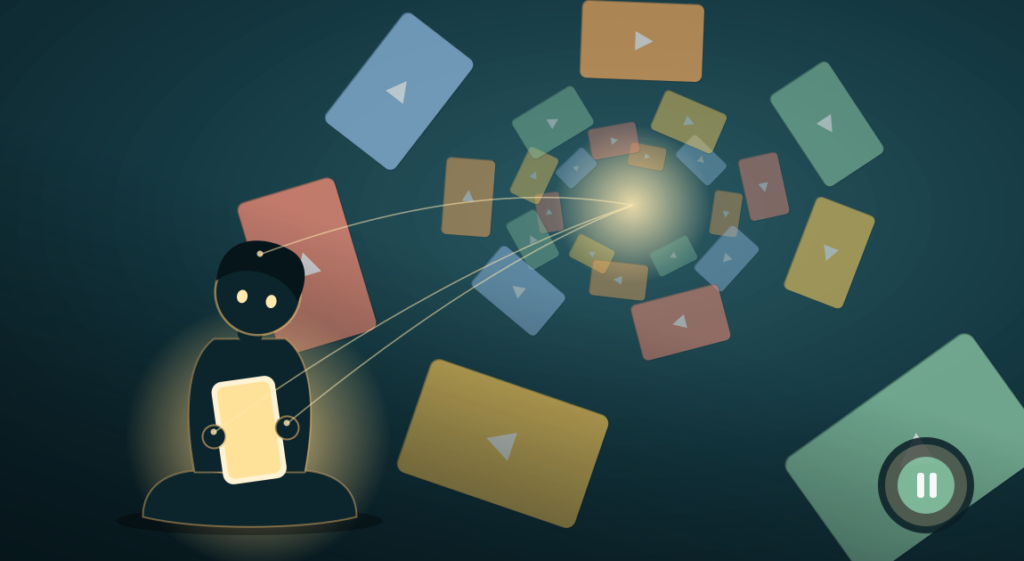
An algorithm is a set of rules a computer follows. In video and social media apps, a recommendation algorithm decides what you see next. Systems like these learn what a person seems to prefer and shape the feed to match, as described in a 2025 academic paper on persuasive app design.
Think of a shopkeeper who notices which shelves you stop at, remembers every visit, and quietly rearranges the shop so your favorite things are always at the front. Now imagine that shopkeeper never sleeps and is serving millions of people at the same time.
Apps do not publish exactly which signals they use. Commonly described ones include what you watch, how long you watch, what you skip, and what you like or share. The details differ between apps and change often, so be careful with any article that claims to know the “secret recipe.”
The algorithm is only half the story
The algorithm works together with design features that remove natural stopping points:
- Autoplay: the next video starts by itself.
- Infinite scroll: the page has no bottom. New content keeps loading, which research has linked to noticeably longer screen time (Meinhardt et al., 2026).
- Personalized recommendations: each next item is chosen to match what held your attention before.
The American Academy of Pediatrics (AAP) looked at this in its January 2026 policy statement, Digital Ecosystems, Children, and Adolescents. It describes endless scroll, autoplay and recommendation algorithms as “engagement-based” features that may prolong use and weaken a child’s sense of control (summary in Contemporary Pediatrics). The AAP’s parent site adds that features like these are not built with children’s well-being in mind (HealthyChildren.org).
This is also a public conversation beyond parenting. The European Commission has examined the design of TikTok under its Digital Services Act, with concerns about “rabbit hole” effects. That discussion is still ongoing and is not a final verdict on any one app.
How might this affect a child?
What we can say with reasonable confidence
The AAP says children may find these digital lures hard to resist, and that autoplay and endless scrolling may make it harder to step away from a device. Children are still learning self-control, so a feed with no natural “stop” is a lot to ask of them.
What is less certain
You may read that algorithms “hijack the brain” or “flood it with dopamine.” These are popular simplifications. From what I found, the research supports the idea that design makes stopping harder. It does not show a simple, dramatic form of brain damage.
“Screen addiction” is also a common phrase, but many doctors and researchers prefer words like “problematic use” or “difficulty stopping.” If you are worried about your child, a pediatrician or child psychologist is the right person to ask.
One more important point: the AAP’s updated guidance moves beyond simple screen time limits and looks at the wider digital environment (Contemporary Pediatrics). It also recognizes that screens can bring real benefits, including learning, social contact and creativity. So the useful question is not only “How many minutes?” It is also “What is my child doing, how does it end, and what is it replacing?”
You are not failing: most families find this hard
A review of 95 samples covering about 90,000 young children found that only around 25% of children under 2, and 34% of those aged 2 to 5, met the AAP’s one-hour-or-less recommendation (reported in a 2026 Pediatrics commentary). If screens help you cook dinner, finish work or simply rest, you are in very large company. The goal is not perfection. It is a few small, steady changes.
Seven practical steps for real homes
1. Turn off autoplay
This is the simplest high-impact change. The AAP recommends that autoplay be off by default. When a video ends and nothing else starts, your child gets a small pause to decide, “Do I want another one?” Check the settings in each app your family uses, including video, streaming and games.
2. Talk about the design, not just the clock
The AAP suggests asking children how they decide they are “done” with a device, and talking with them about design features that make stopping hard. Try it: “Did you notice the next video started by itself? Why do you think the app does that?” Many children enjoy “spotting the trick,” and it builds a skill they will use for life.
3. Try grayscale as an experiment, not a cure
Switching a phone to black and white costs nothing and takes a minute. In a 2024 study of 84 people, a week of grayscale reduced daily screen time by about 20 minutes, but the number of times people picked up their phone did not change. Participants felt more in control and less stressed, but sleep and productivity did not improve (Dekker & Baumgartner, 2024). A 2026 trial with medical students found a similar modest drop of about 28 minutes a day, and one participant said they simply used other devices instead (Frontiers in Digital Health).
These studies were not done with young children, and the ones I could check involved university or medical students. So grayscale may help a teen or an adult, and it is free to try, but please do not expect it to solve the problem on its own.
4. Protect sleep with a “screens park here” spot
A review published in the journal Pediatrics concluded that children and teens are especially vulnerable to sleep disruption from electronics, and a tip for parents was to limit media use in the hour before bed (University of Colorado Boulder coverage). Penn State’s 5-2-1-0 program, drawing on earlier research, notes that screens in the bedroom are linked to less and poorer sleep, even when they are not in use (Penn State).
Researchers are still working out how much of this comes from screen light, how much from later bedtimes, and how much from exciting content. You do not need to settle that debate. A charging spot outside the bedroom is easy to set up and helps in every case.
5. Make a few device-free zones, for everyone
Choose one or two moments, such as meals or the first half hour after school or work, when phones are away for adults too. Children watch what we do, and a rule that applies to everyone feels fairer.
6. Add friction, not fights
Researchers use the term “design friction” for small obstacles that interrupt automatic use. At home, friction can be low-tech: devices charge in a basket, a parent holds the app password, or you give a warning before the screen goes off (“Two more minutes, then we pause”). A predictable routine means fewer surprises, and fewer meltdowns.
7. Offer something easy to move to
Stopping is easier when there is something appealing next. Keep a ready option nearby: a ball, drawing materials, a card game, music, or a chance to help with cooking. https://parentinglap.com/2025/12/10-screen-free-activities-for-kids-to-boost-creativity-health-fun/
A guide by age
Only for children under five do the major health bodies give clear numbers. For older children, the AAP’s newer guidance focuses on quality, context and conversation instead of one fixed limit. The practical ideas below are suggestions, not official rules.
| Age | What the sources say | Practical ideas |
| Under 2 | The WHO recommends no sedentary screen time under age 1 and none for 1-year-olds. For 2-year-olds, no more than 1 hour, and less is better (WHO, 2019). | Shared video calls with family, with you beside your child, are different from solo autoplay. |
| 3–4 years | WHO: no more than 1 hour a day, with reading, singing and storytelling encouraged when sitting still. | Use a clear “all done” routine, such as a song or visual timer. |
| 5–10 years | No single number in the sources I reviewed. The AAP encourages talking about how children decide they are done and about design features that make stopping hard. | Autoplay off, agree start and stop times before the device comes out, no screens in bedrooms at night. |
| 11+ years / teens | Same AAP guidance, with more emphasis on conversation. The AAP also points families to a Family Media Plan tool. | Make the rules with your teen, protect sleep first, and keep adult habits in the same rules. |
| Adults | The studies on grayscale and design friction were mostly done with adults. | Try the family challenge below together. |
A one-week family challenge
Make it a shared experiment, not a punishment. For one week, everyone in the family picks one change: autoplay off, grayscale on, phones charging outside bedrooms, or a device-free dinner. At the end of the week, talk about what felt easy, what felt hard, and what you want to keep. Children tend to respect rules more when they have helped shape them. That is common parenting experience rather than a research finding, so treat it as a suggestion.
Frequently asked questions
Do I need to ban screens completely?
No. The AAP recognizes that digital media can offer educational, social and creative benefits. The focus is on a healthy balance, good content, and making sure screens do not crowd out sleep, play and family time.
Will grayscale work for my child?
It may help a little, mostly shown in adults and university students so far. It is free and easy to undo, so it is worth a short trial, but it is not a complete solution.
What if my child gets upset when I change the settings?
Expect an adjustment period. Explain the change in simple words, give a warning before screen time ends, and offer a favorite activity afterward. If strong reactions continue or worry you, speak with your child’s pediatrician or a child psychologist.
Key takeaways
- Stopping is hard partly because of design. Algorithms, autoplay and infinite scroll are built to keep people engaged. It is not only a lack of willpower.
- The AAP’s 2026 guidance looks at the whole digital environment, not just minutes.
- Turn off autoplay, talk about how apps work, and keep screens out of bedrooms at night.
- Grayscale may reduce use a little, mostly shown in adults. It is worth a try, not a cure.
- The science is still developing. Be careful with dramatic claims about “brain hijacking.”
- Small, steady changes work better than strict rules that cause daily battles. https://parentinglap.com/2025/05/parenting-screen-addiction/
Moving forward
Parenting in a digital world does not mean winning a daily argument about a phone. When we understand that apps are designed to be hard to put down, we can stop blaming ourselves or our children and start changing the environment. Turn off autoplay, protect sleep, share the rules, and keep offering real-world moments that are more fun than a feed. Small steps add up.
A gentle reminder: This post is for general education and is not medical advice. If you are concerned about your child’s sleep, mood, behavior, learning, or how they react when screens are taken away, please speak with your pediatrician or a child psychologist.
Want to read more?
- AAP policy statement: Digital Ecosystems, Children, and Adolescents – the full 2026 guidance.
- Helping Kids Thrive in a Digital World – the AAP policy explained for parents.
- WHO guidelines for children under 5 – sleep, activity and screen time, as described in the Journal of Physical Activity and Health.
- Grayscale smartphone study (Dekker & Baumgartner, 2024) – what one week of black and white did.
- Kids and sleep disruption from electronics – University of Colorado Boulder on a Pediatrics review.
- Infinite scrolling and design friction (2026 research paper) – for readers who enjoy the technical detail.